This comprehensive Shopify SEO guide covers everything you need to scale your store’s organic visibility as online competition intensifies.
If you are planning to launch a new Shopify store, start with our Shopify Store Creation: A Complete Guide for Business Owners to understand the essential steps involved in building and preparing your storefront before moving on to advanced SEO strategies.
The changing landscape of eCommerce search means modern brands must quickly adapt to semantic algorithms, conversational queries, and interactive AI-generated overviews that shift buyer behavior.
While the platform offers helpful built-in features, default Shopify settings need manual optimization to overcome inherent structural limitations, clear up duplicate navigation paths, and achieve maximum performance.
Turn your store into a high-performing asset by systematically auditing your technical code, enhancing page speed metrics, and implementing strategic keyword structures across every collection level.
1. Core Shopify SEO Settings and Architecture
Building a successful digital storefront requires aligning your site’s infrastructure with the specific ways search engine crawlers explore the web. Managing a complete Shopify SEO tutorial strategy begins with an audit of how search bots read and interpret your store’s underlying code. If your technical architecture is unorganized or confusing, your on-page copywriting and link-building campaigns will struggle to deliver great returns.
Configuring the Search Engine Listing Section in Shopify
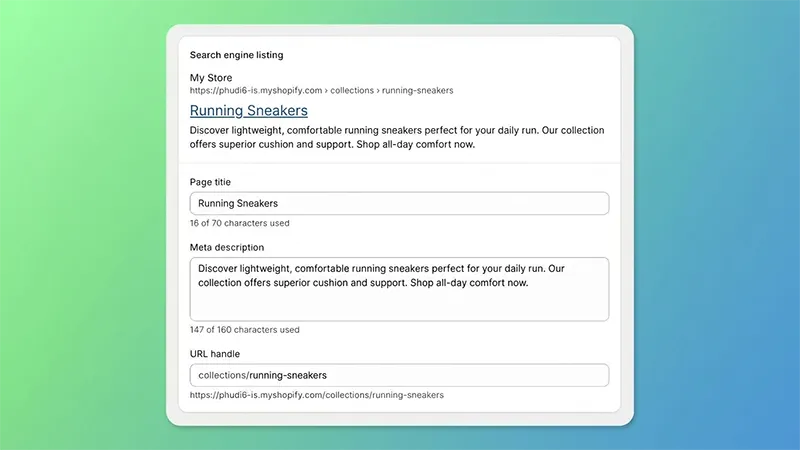
Shopify consolidates your primary snippet optimization tools into a single dedicated interface located at the bottom of your content creation pages. Managing these fields in one unified workflow ensures your search metadata aligns perfectly with your indexing strategy.
Accessing the Interface
To configure these settings, navigate to your Shopify admin panel and select the specific content type you want to optimize:
- Product Pages: Navigate to Products and click on a specific product listing.
- Collection Pages: Navigate to Products, select Collections, and open a target collection.
- Standard Pages: Navigate to Online Store, select Pages, and choose an informational page.
- Blog Posts: Navigate to Online Store, select Blog Posts, and open your target article.
Scroll completely to the bottom of the editing workspace to locate the Search engine listing preview section. Click the Edit website SEO text link to open the three configuration boxes: Page title, Meta description, and URL handle.
Page Title Optimization
The Page title field populates the HTML <title> tag of your page. This functions as the clickable headline shown in organic search engine results and the label displayed on browser tabs.
- Length Target: Maintain a length under 60 characters to prevent search engines from cutting off your text with ellipses in desktop and mobile results.
- Formatting Blueprint: Place your primary target keyword at the very beginning of the title where it carries the highest structural weight for search algorithms. Follow this with a highly specific product attribute or a compelling value proposition, and conclude with your brand name. Avoid using excessive punctuation marks or unnatural keyword lists.
Meta Description Configuration
The Meta description box generates the snippet text displayed beneath your title link in search results. While it does not directly influence ranking algorithms, it heavily impacts your organic click-through rate.
- Length Target: Aim for 150 to 160 characters. Writing beyond this limit causes text truncation, while writing too little misses an opportunity to pitch your page value to shoppers.
- Formatting Blueprint: Write a clear, natural sentence that accurately describes the content of the page. Integrate your primary keyword naturally alongside a clear call to action like “Shop online,” “Explore our collection,” or “Read the full guide.” Focus on providing an explicit benefit or unique selling proposition to encourage searchers to click through to your store.
URL Handle Calibration
The URL handle box controls the exact text string appended to your core storefront directories. It is critical to understand that Shopify relies on an unchangeable folder routing system that sorts your assets into fixed subfolders: items live within /products/, category pages sit under /collections/, informational pages use /pages/, and blog posts route through /blogs/.
Because you cannot remove these mandatory root paths to create custom flat structures, your manual adjustments within this box are strictly limited to the final slug.
- Formatting Blueprint: Keep handles short, clean, and entirely lowercase. Separate words exclusively with hyphens, and focus the slug strictly on your primary target keywords. Strip out all filler words like “and,” “the,” or “for,” alongside any unnecessary tracking parameters, symbols, or numbers.
- The Redirect Safety Rule: If you alter the URL handle of an existing, live page that has already been indexed or has active backlinks, ensure you check the checkbox labeled Create a URL redirect for… directly below the handle box. Leaving this unchecked instantly creates a broken 404 error page, destroying any accumulated ranking equity and cutting off traffic.
Setting Up Essential Tracking Tools
You cannot consistently improve your store’s performance without accurate, reliable data tracking. Setting up your analytics framework properly ensures you can monitor exactly how search platforms view your storefront.
- Google Search Console Integration: This platform acts as your direct feedback loop with the search index. To verify ownership, copy the unique HTML meta verification tag from your search console dashboard. Open your Shopify admin, navigate to your theme’s code editor, locate your main layout file, and paste the code directly inside the header block before saving.
- Google Analytics 4 Tracking Configuration: GA4 provides deep insights into user behavior and conversion data. To connect it seamlessly, use the native Google channel app within your admin dashboard, which links your data stream without requiring complex manual script tracking.
- Dynamic XML Sitemap Submission: Shopify automatically generates a self-updating site index file at your store’s root address. Open your search console dashboard, navigate to the sitemaps section, enter sitemap.xml, and hit submit to ensure crawlers can instantly discover new inventory updates.
Customizing Your Theme Architecture
Your active storefront theme serves as the visual presentation layer for your customers and the underlying code framework for search crawlers. Clean, optimized theme files ensure search engines can read your content without getting stuck.
- Robots File Customization: Shopify allows you to modify your crawler rules using a specific theme template file. Creating this file allows you to block search engines from wasting crawl budget on duplicate filter loops or low-value system pages.
- Heading Tag Distribution Optimization: Many out-of-the-box themes contain layout flaws that wrap logos or minor promotional banners in primary header tags. Review your template code to ensure every page contains exactly one unique title tag reserved for the primary subject matter, cascading down into logical subheadings based on importance.
2. Technical SEO Optimization for Shopify Stores
Achieving long-term ranking success requires a focused approach to technical search engine optimization for Shopify. Technical optimization improves your store’s load times, ensures your code is highly readable for algorithms, and fixes hidden errors that can drag down performance. Resolving these deeper technical issues gives your store a distinct competitive advantage as search platforms shift toward instant answers.
Solving the Shopify Duplicate Content Issue
The most common technical indexing challenge with Shopify is the way it naturally generates duplicate product paths during site navigation. While the platform uses specific automated internal routing rules to resolve trailing slashes and enforce sitewide canonical tags, its native theme logic can cause issues when users browse items through collections.
By default, when a user clicks an item within a collection overview page, the platform builds a URL that includes that collection subfolder, like this:
yourdomain.com/collections/apparel/products/classic-shirt
At the same time, the true, canonical version of that product page exists at its flat root path:
yourdomain.com/products/classic-shirt
Because both addresses display identical content, search engines face a duplicate path dilemma. While the platform inserts canonical tags pointing to the root path, crawlers still waste valuable energy exploring both versions. Over time, this split structure dilutes your internal link equity and can lead to unstable keyword tracking.
To fix this architectural issue, adjust your theme’s collection loop files to link directly to the clean product path. Look through your theme files for layout files like product-grid-item.liquid or product-card.liquid. Inside the code, locate the product link variable, which usually includes a collection filter rule:
{{ product.url | within: collection }}
Simply remove the filter rule to clean up the code, updating it to output the direct product variable:
{{ product.url }}
This quick adjustment ensures your collection pages link exclusively to your clean, primary product URLs, which focuses your internal link authority and prevents duplicate URL discovery.
Finally, manage your faceted navigation filters and pagination rules carefully. When customers filter collections by size or color options, Shopify creates unique parameter parameters. Ensure all filtered variations carry a clean canonical link pointing back to the main collection page to keep your index clear of duplicate sorting paths.
Maximizing Core Web Vitals and Site Speed
Page speed is a critical ranking factor and a direct driver of e-commerce sales. Online shoppers expect immediate load times, and search algorithms actively downrank storefronts that fail core performance standards.
- Audit App Scripts: Every application you add from the app store inserts extra code and external scripts into your core layout. Regularly review your apps and remove unused tracking tools to eliminate unnecessary background requests that slow down your store.
- Configure Lazy Loading: Ensure all images within your collection grids use native lazy loading attributes. This instructs browsers to download product photography only as the user scrolls them into view, lowering initial load weight.
- Defer Render-Blocking Elements: Postpone the execution of non-essential scripts, such as customer loyalty pop-ups or review widgets, until after your primary page elements have fully rendered for the user.
Implementing Advanced Schema Markup
Structured data code acts as an explicit translator, organizing your product data so search engine bots can easily understand it. Adding advanced schema markup helps your products win rich results, star ratings, and standout placements in AI summaries.
- Product Parent Attributes: Ensure your product page code dynamically outputs the exact item name, brand entity, detailed description, SKU, and manufacturer part numbers.
- Granular Offer Structured Data: Nest a detailed offer schema block inside your product markup to clearly pass price numbers, currency types, and stock availability signals. Include valid date properties to show exactly how long promotional pricing lasts.
- Aggregate Reviews Integration: Link your customer reviews app directly to your structured data. Providing clear overall rating values and review counts allows search platforms to confidently display your star ratings and price ranges directly in search results.
- Organization and Navigation Maps: Add sitewide organization schema to connect your brand’s official social profiles and contact channels. Use breadcrumb schema to map out your category paths, which clarifies your store’s layout for search engines and shoppers alike.
3. On-Page SEO and Content Optimization
With your technical foundations secure, you can focus on building high-converting on-page content. Using smart Shopify SEO tips across your copywriting helps ensure your category layouts and individual product pages closely match the search terms your potential buyers use. On-page optimization helps bridge the gap between initial discovery and successful checkouts.
If you need a Shopify SEO expert to improve your store’s search visibility, our specialists can help optimise your product descriptions, category pages, and on-page content to align with relevant search terms.
eCommerce Keyword Research Strategy
Successful search positioning relies on a deep understanding of user intent. You must clearly separate informational search queries from commercial transactional intent to deliver the exact experience shoppers expect.
- Informational Intent Queries: These happen when users seek answers, guides, or tutorials online. Target these keywords within your blog posts and content hubs to build brand authority early in the customer journey.
- Commercial Transactional Queries: These search terms indicate that a user is actively ready to purchase a product. Map these high-intent phrases directly to your collection pages and individual product descriptions to capture users at the point of sale.
- Long-Tail Keyword Research: When optimizing category pages, look for specific, low-competition phrases that your competitors might overlook. Focus on modifiers that reflect real-world shopping habits, like specific colors, material types, or unique use cases.
Optimizing High-Converting Product Pages
Your product pages serve as the primary conversion engine for your storefront. Optimizing these pages requires combining persuasive copywriting with strategic keyword placement inside your HTML code.
- Original Description Writing: Avoid copying text directly from manufacturer sheets. Reusing generic vendor descriptions creates duplicate content issues that make it difficult to rank. Instead, write fresh product descriptions that highlight unique benefits, real-world utility, and material quality.
- Image Alternative Text: Search engine crawlers cannot read your product photography without descriptive text. Write clear, contextual alt tags that describe the image accurately while naturally incorporating your target keywords, avoiding unnatural lists of terms.
Maximizing Category Page Ranking Potential
Collection pages hold massive ranking potential because they target broader, high-volume search phrases. To maximize their performance, add descriptive content sections directly above or below your product grids. Write clean introductory copy that sets up your collections and naturally incorporates relevant secondary keywords. To keep your layouts user-friendly, consider placing longer, detailed text blocks at the bottom of the page beneath the product displays to provide context for search crawlers without distracting shoppers.
You should also build intentional internal link networks between related collections to distribute ranking authority throughout your site. If a shopper is browsing a collection of footwear, include natural links to related categories like shoe care accessories or socks within the body text or sub-navigation menus. This internal linking pattern helps search engines discover new pages while clarifying your store’s taxonomy.
4. Content Marketing and Blogging on Shopify
Building a memorable e-commerce brand requires extending your digital content footprint beyond standard commercial listings. Embracing content marketing allows you to capture buyers early in their shopping research, helping you build long-term authority and brand trust.
Utilizing the Native Shopify Blog Engine
Many online merchants overlook Shopify’s built-in blogging features, treating them as simple tools meant only for corporate news or minor announcements. However, when managed strategically, your blog can become a powerful customer acquisition channel. Shift your focus away from internal news and create educational, long-form content that addresses real problems your customers face. Publishing helpful buying guides, comparison articles, and care tutorials attracts shoppers who are actively researching products in your niche.
- Create Content Hubs: Build organized topic groups that link your educational blog articles directly to your primary transactional categories.
- Pass Authority Naturally: Use contextual links within your articles to guide readers toward your product pages, passing link equity to your commercial landing areas.
- Clean Tag Classification: Establish consistent tagging rules for your blog posts to avoid internal keyword competition. Ensure every article targets a distinct variation of user intent to keep your search footprint organized.
5. Off-Page SEO and Digital PR for eCommerce
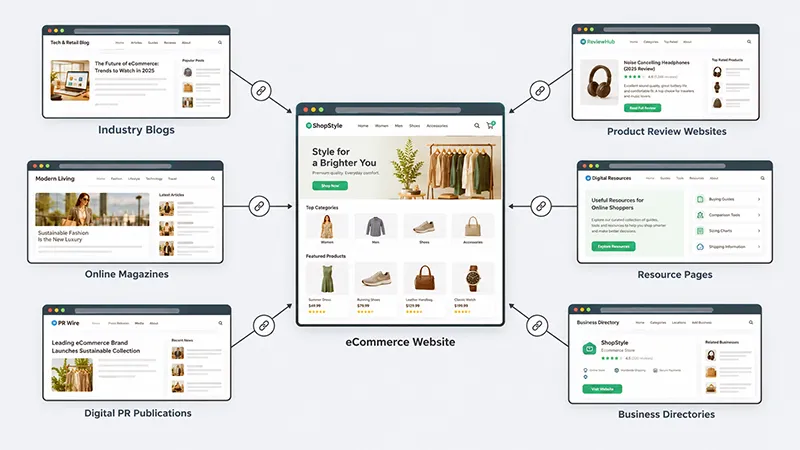
While optimizing your internal site elements is critical, your store’s overall authority is largely determined by external signals. Off-page optimization and digital public relations work together to build the online trust, credibility, and link equity required to outrank established competitors.
Link Building Strategies for Online Retailers
Earning high-quality backlinks remains one of the most effective ways to boost your rankings. For online merchants, this means acquiring links from trusted, contextually relevant websites rather than chasing low-quality directory listings.
- Resource Page Outreach: Find resource listings, gift guides, and buying directories within your industry. Reach out to site owners with personalized notes explaining why your product or guide serves as a valuable resource for their audience.
- Unlinked Brand Mentions: Monitor the web for articles that mention your brand name but do not include a functional hyperlink. Send a friendly request to the authors to turn those mentions into active links, helping their readers navigate back to your store.
- Digital PR Campaigns: Create unique data studies, infographics, or standout product innovations that attract the attention of journalists and industry publications to earn high-authority editorial backlinks.
Local SEO Strategy for Hybrid Shopify Retailers
If you run brick-and-mortar locations alongside your online Shopify storefront, local search optimization is a key piece of your growth plan. Optimize your web presence to capture local shopping intent by keeping a complete Google Business Profile active for every physical location.
- Maintain Name, Address, and Phone Consistency: Keep your contact details perfectly uniform across your website, social accounts, and local business directories to build trust with search engines.
- Build Localized Storefront Pages: Create dedicated location landing pages on your Shopify store. Use these pages to feature store-specific inventory, embed maps, show operating hours, and display reviews from local shoppers.
6. Monitoring Performance and Post-Launch Audits
Organic optimization is an ongoing process of monitoring, adjusting, and continuous refinement. Launching your initial updates is only the first step; you must regularly audit your store’s performance to protect your ranking gains and fix technical bugs before they harm your revenue.
Identifying Technical Degradation
E-commerce sites are highly dynamic environments where theme adjustments, inventory updates, and app changes happen constantly. This continuous activity can introduce technical errors that quietly hurt your search visibility over time.
- Perform Regular Site Walks: Run automated monthly scans to catch broken links and bad redirect loops early.
- Manage Permanent Redirects: When deleting out-of-stock products or changing collections, always set up permanent 301 redirects to guide users and search bots to the closest active page.
- Monitor Search Analytics: Watch your keyword tracking data closely. If you spot a sudden drop in visibility, look for common causes like accidental indexing blocks or layout changes from a recent theme update.
Leveraging Shopify SEO Apps for Scalable Growth
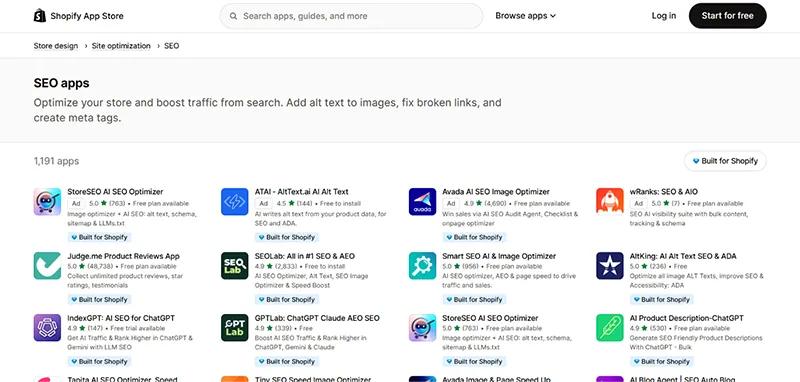
Managing a large catalog with hundreds of products can quickly become difficult to handle manually. Using trusted applications from the Shopify App Store helps you automate repetitive tasks, optimize core web vitals at scale, and implement advanced technical elements like schema data without needing to write complex code.
For a detailed comparison of tools, check out our guide to the 7 Best Shopify SEO Apps to find the right options for your store.
- Yoast SEO: Features real-time content analysis for product descriptions, readability scoring, and automated metadata formatting templates.
- TinyIMG: Focuses on automated image compression, bulk alt-text generation, and site speed optimization for media-heavy storefronts.
- SearchPie: Offers automated meta tag generation for massive catalogs, real-time tracking for broken links, and built-in sitemap management tools.
- StoreSEO: Provides straightforward tools for editing product meta titles and descriptions, managing alt-text, and fixing broken links.
- Smart SEO: Automatically generates meta tags and alt tags using flexible templates, plus it handles automated sitemap generation.
- Booster SEO: Specializes in bulk image compression, structured data schema optimization, and monitoring broken redirect loops.
- Avada: An all-in-one page speed and image optimizer that includes meta tag rules, alt-text automation, and site speed acceleration features.
- Plug in SEO: A comprehensive auditing engine that scans storefronts for ranking obstacles, checks keyword trends, and manages broken links.
- Ilana’s JSON-LD for SEO: Focuses exclusively on advanced structured data automation to help products win Google rich results and star ratings.
As you prepare to roll out these advanced adjustments across your catalog, ensuring that your core storefront configurations are executed correctly remains a prerequisite for success. To review your foundational settings before making deep technical changes, explore our detailed guidelines for setting up a Shopify store.
Now that you have covered the key aspects of optimizing a Shopify website, explore Shopify’s SEO guide for additional tips on improving your store’s search visibility and attracting more organic traffic.
Final Thoughts on Building a Sustainable Shopify SEO Strategy
Shopify SEO requires aligning technical architecture with search crawler mechanics. While the platform natively manages sitemaps and canonical tags, its rigid folder structure can generate duplicate product paths that dilute link equity.
Resolving these duplicates within liquid template files ensures clean indexing. Strategic optimization balances informational blog content with high-converting collection pages using precise metadata and structured schema data.
Consistent performance monitoring, script auditing, and quality backlink acquisition build sustainable organic authority that lowers acquisition costs and drives long-term sales growth.
Looking for eCommerce SEO Services for Your Shopify Store?
Crest eCommerce provides professional eCommerce SEO services to help Shopify businesses improve search rankings and attract more potential customers. Our team focuses on Shopify-specific SEO improvements to strengthen your store’s organic visibility and support business growth. Reach out to us to discuss your SEO requirements and improve your store’s search performance.
Frequently Asked Questions About Shopify SEO
Here are some common questions about Shopify SEO and its implementation.
Is Shopify Good for SEO?
Yes, Shopify is an excellent platform for organic search growth. It natively handles core optimizations well, including automated sitemap generation, clean canonical tag management, fast server responses, and simple metadata editing fields. While its fixed URL folders require some manual technical adjustments to resolve duplicate collection paths, its underlying framework easily supports scaling online brands to millions of organic visits.
How Much Does Shopify SEO Cost?
The overall cost depends entirely on your strategy and technical experience. If you handle the optimizations yourself using native platform features, your costs can be minimal. However, growing an online store often involves investing in premium automation apps, hiring technical developers, or partnering with an e-commerce agency, with investments ranging from minor monthly software fees to larger professional retainers.
How Long Does Shopify SEO Take to Show Results?
Typically, visible organic traffic growth and ranking improvements take between 3 to 6 months to appear. Search engine bots need time to discover your updated code structures, evaluate your content quality, and measure user engagement signals. Because search equity compounds over time, the technical and on-page updates you implement today will build long-term authority for your storefront.
Can You Do Shopify SEO Without Apps?
Yes. You can manage almost every important search optimization natively within Shopify without installing third-party applications. The core dashboard allows you to write custom meta titles, edit image alternative text, set up URL redirects, and customize your crawler instructions directly. While apps save time through automation, executing a successful optimization strategy manually is completely possible.
What Are the Biggest Shopify SEO Challenges?
The main challenges involve the platform’s rigid default routing rules. These include the automatic generation of duplicate product URLs through collection grids, the inability to alter root subfolders like /products/, and disorganized heading hierarchies found in many commercial templates. Fortunately, you can fix these issues with minor code adjustments and clean theme edits.
Should I Hire a Shopify SEO Expert?
Hiring a specialist is a smart move if you manage a massive product catalog with complex technical issues, need to rewrite template files safely, or lack the internal resources to consistently write content. An experienced developer or strategist can perform deep audits and implement scalable optimizations that save your business time and protect your margins.
How Often Should I Audit My Shopify Store?
You should run a comprehensive technical check on your storefront at least once every quarter. Because online stores change constantly with inventory updates, theme changes, and app tests, running regular technical crawls helps you catch broken links, code errors, and performance drops before they affect your sales.
Which Shopify Pages Should Be Prioritized for SEO?
Always focus your optimization efforts on your main collection and category pages first. These high-level hubs target broad, high-volume search phrases and naturally pass ranking equity down to your individual products. Once your primary collections are fully optimized, focus your attention on your top-selling products, followed by your informational blog content.