

The right eCommerce website design ideas can improve how visitors interact with your store at every stage of the buying journey. The goal is not simply to make an online store look attractive.
Each design decision should help customers find products, understand their choices, and complete purchases with less effort. The following ideas explain practical ways to improve different parts of an eCommerce website.
1. Create a Clear and Simple Homepage
The homepage is usually the first major touchpoint between your brand and a potential customer. It should communicate what you sell and direct visitors towards the most important parts of your store without creating confusion. A clean structure gives shoppers a clear path from their first visit to product discovery.
To create a more effective homepage:
- Use a strong value proposition: Explain what your store offers and why customers should consider your products. Keep the message short and place it prominently near the top of the page.
- Provide clear navigation: Use simple menu labels that help visitors reach product categories, collections, offers, and other important pages.
- Show featured products and categories: Highlight bestsellers, new arrivals, popular categories, seasonal products, or special collections to help visitors start shopping.
- Add prominent calls to action: Use clear buttons such as Shop Now, Explore Collection, or View Products to guide visitors towards relevant pages.
A simple homepage is one of the most useful eCommerce website design ideas because it reduces distractions and gives visitors an obvious next step.
2. Make Product Categories Easy to Find
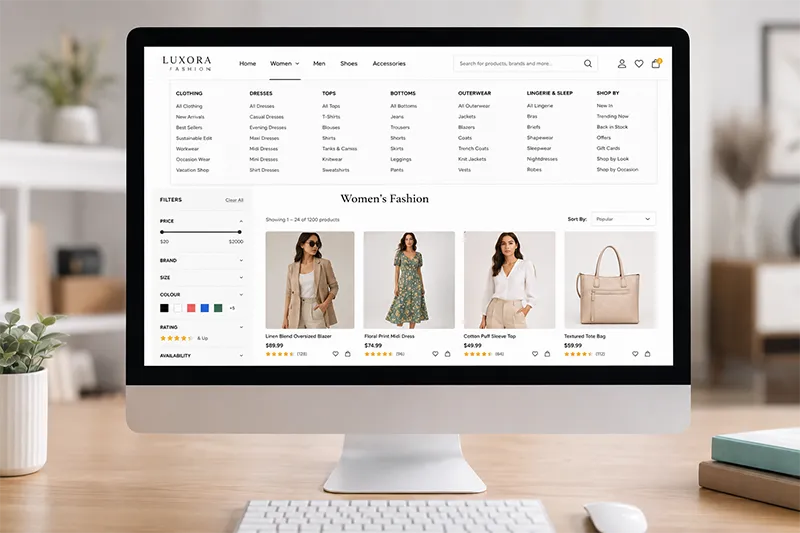
Customers should be able to understand your product structure within seconds. If categories are confusing or buried inside complicated menus, visitors may leave before finding what they need. Organising products around customer expectations can make browsing much easier.
Consider the following when organising your categories:
- Create a logical category structure: Group related products together and use clear parent and subcategories where necessary.
- Use dropdown menus: Allow visitors to access important subcategories directly from the main navigation without opening several pages.
- Add filters and sorting: Let shoppers narrow products by factors such as price, brand, size, colour, rating, or availability.
- Include search functionality: Give customers a direct way to find a specific product when they already know what they are looking for.
A well-planned category system is particularly important for stores with a large product catalogue.
3. Use High-Quality Product Images
Customers cannot physically inspect products when shopping online. Your images therefore need to provide a clear visual understanding of what the customer can expect. Good product photography can also make your catalogue look more professional and consistent.
Improve product presentation with these approaches:
- Provide multiple product views: Show important angles so customers can examine the product from different perspectives.
- Add zoom functionality: Allow visitors to inspect details such as textures, finishes, stitching, materials, or product features.
- Maintain a consistent image style: Use similar backgrounds, proportions, lighting, and image quality throughout your catalogue.
- Add product videos where useful: Demonstrate how products work, how they are used, or what they look like from different angles.
Images should also be properly optimised so high visual quality does not come at the expense of page speed.
4. Design Product Pages That Encourage Purchases
A product page should answer the questions a customer may have before placing an order. Visitors should not need to search through several pages to understand the product, its price, available options, or purchase conditions.
Build stronger product pages by including:
- A clear product name and pricing: Make the product title and current price immediately visible. Show discounts clearly when applicable.
- Detailed product descriptions: Explain important features, benefits, specifications, dimensions, materials, and usage information.
- Reviews and ratings: Give customers access to feedback from previous buyers to help them evaluate the product.
- Stock information: Clearly indicate whether the product is available, low in stock, or unavailable.
- Size, colour, and variant options: Make product choices easy to select and clearly show the option currently selected.
- A clear “Add to Cart” button: Give the main purchasing action enough visual prominence so customers can find it immediately.
The product page should provide useful information while keeping the path towards purchase simple.
5. Make Your eCommerce Website Mobile-Friendly
A mobile-friendly website should provide a comfortable shopping experience regardless of screen size. Customers should be able to browse products, use filters, read descriptions, and complete checkout without struggling with the interface.
Focus on these areas:
- Use responsive design: Make layouts, images, text, menus, and other elements adapt smoothly to different screen sizes.
- Use touch-friendly buttons: Give buttons and interactive elements enough size and spacing for comfortable tapping.
- Create easy mobile navigation: Make categories, search, account features, wishlist, and cart accessible without complicated menus.
- Keep the checkout process simple: Reduce unnecessary fields and make address, payment, and order details easy to enter on smaller screens.
Mobile usability should be considered throughout the design process rather than treated as an additional feature after the desktop website is complete.
6. Use a Prominent Search Bar
Search is particularly valuable for stores with extensive product catalogues. Customers who already have a specific product in mind should be able to search for it without navigating through multiple categories.
A useful site search can include:
- Search suggestions: Display relevant products, categories, or search terms while customers enter their query.
- Autocomplete: Help users complete common product searches with fewer keystrokes.
- Relevant search results: Make sure results closely match the customer’s search intent instead of displaying loosely related products.
- Filters for large product catalogues: Let customers refine results by price, brand, category, size, colour, rating, availability, or other relevant attributes.
A prominent and useful search experience can significantly reduce the effort required to find products.
7. Simplify the Shopping Cart and Checkout
The checkout process should remove unnecessary friction. Customers who have already decided to purchase should not face lengthy forms or unexpected information at the final stage.
A simpler checkout can be created by focusing on:
- Minimal checkout steps: Remove unnecessary screens and fields from the purchasing process.
- Guest checkout: Allow customers to complete an order without creating an account if registration is not essential.
- Multiple payment options: Offer suitable payment methods based on your customers and target market.
- Clear shipping information: Show delivery charges, available methods, and estimated delivery times before the final purchase.
- An order summary: Clearly display products, quantities, discounts, shipping costs, taxes where applicable, and the final amount.
A straightforward checkout is among the eCommerce website design ideas that can have a direct impact on completed purchases.
8. Build Trust Through Website Design
Customers need confidence before sharing their personal information or making an online payment. Your website design should make important information visible and reassure visitors throughout the buying process.
You can strengthen trust by including:
- Customer reviews: Show genuine feedback and ratings where shoppers can easily find them.
- Security indicators: Use appropriate security cues to reassure customers when they are entering personal or payment information.
- Return and refund information: Provide a clear policy that explains what customers can expect if they need to return an item.
- Shipping details: Explain delivery options, costs, and estimated timeframes before customers place an order.
- Contact information: Make it easy to find your phone number, email address, contact form, or other support channels.
Trust also comes from consistency. Accurate information, professional design, reliable functionality, and transparent policies can make an online store feel more credible.
9. Use Clear Calls to Action
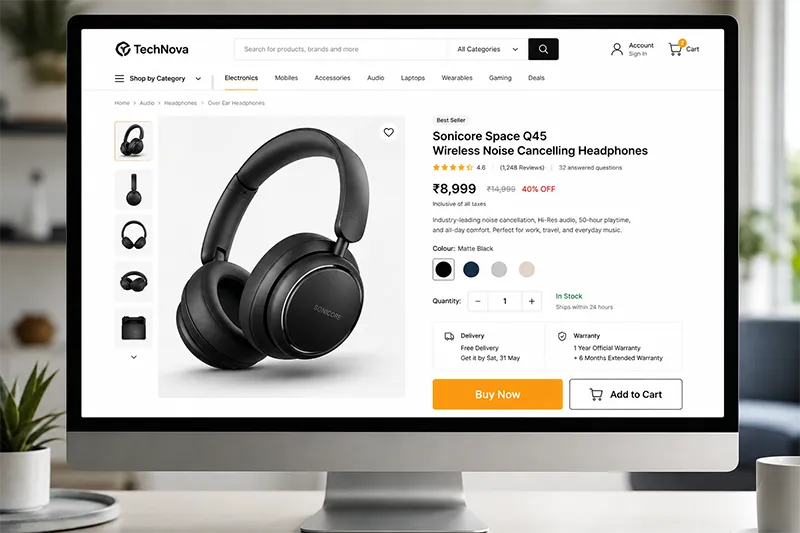
Every important section of an online store should give visitors a clear idea of what they can do next. Calls to action should be easy to identify and should match the purpose of the page or section.
Common calls to action include:
- Shop Now: Direct visitors from promotional areas to relevant products or collections.
- Add to Cart: Give customers a clear way to add a selected product to their shopping cart.
- Buy Now: Move customers towards immediate purchase when a direct buying option is appropriate.
- View Collection: Take visitors to a specific product range or curated collection.
- Get Started: Encourage visitors to begin a process for customised products, subscriptions, or service-based offerings.
Avoid giving every button the same visual priority. The most important action should stand out clearly from secondary actions.
10. Personalise the Shopping Experience
Personalisation can help customers discover products that are relevant to their interests and previous browsing behaviour. It can also introduce complementary products without forcing shoppers to search for them.
Useful personalisation elements include:
- Recommended products: Suggest items based on products a visitor is viewing or has previously purchased.
- Recently viewed products: Allow customers to return easily to products they considered earlier.
- Related products: Display complementary or similar products that may interest the shopper.
- Personalised offers: Present relevant promotions based on customer behaviour, purchase history, or other appropriate signals.
Personalisation should support the shopping journey rather than interrupt it. Recommendations are most useful when they help customers discover something genuinely relevant.
11. Keep Website Speed and Performance in Mind
A fast website makes browsing more comfortable and helps customers move between product pages without unnecessary delays. Performance should therefore be considered alongside visual design and functionality.
Pay attention to the following areas:
- Optimised images: Compress images appropriately while maintaining enough quality for customers to examine products.
- Lightweight design: Avoid unnecessary visual effects, animations, and elements that add complexity without improving the shopping experience.
- Fast-loading pages: Optimise important pages such as the homepage, category pages, product pages, cart, and checkout.
- Efficient scripts and plugins: Review third-party tools and plugins regularly. Remove resources that are unnecessary or no longer being used.
Performance optimisation should continue after launch. Regular testing can help identify new issues as products, integrations, and website functionality grow.
12. Maintain Consistent Branding
A consistent brand identity helps customers recognise your business and creates a more professional experience across the website. Every page should feel connected through common visual and communication elements.
Maintain consistency across these areas:
- Colours: Use a defined colour palette across buttons, headings, banners, links, and other important elements.
- Typography: Select suitable fonts and maintain consistent styles for headings, body text, product information, and other content.
- Product imagery: Follow a consistent approach to backgrounds, proportions, lighting, and presentation.
- Buttons: Use a consistent visual style so customers can easily recognise primary and secondary actions.
- Layout: Maintain consistent spacing, alignment, grids, and page structures throughout the website.
- Brand voice: Use a recognisable tone across product descriptions, promotional messages, navigation labels, and other website content.
Consistent branding makes the store feel more cohesive and memorable. When combined with usability, performance, and clear product presentation, these eCommerce website design ideas can help create an online store that looks professional and provides a better shopping experience.
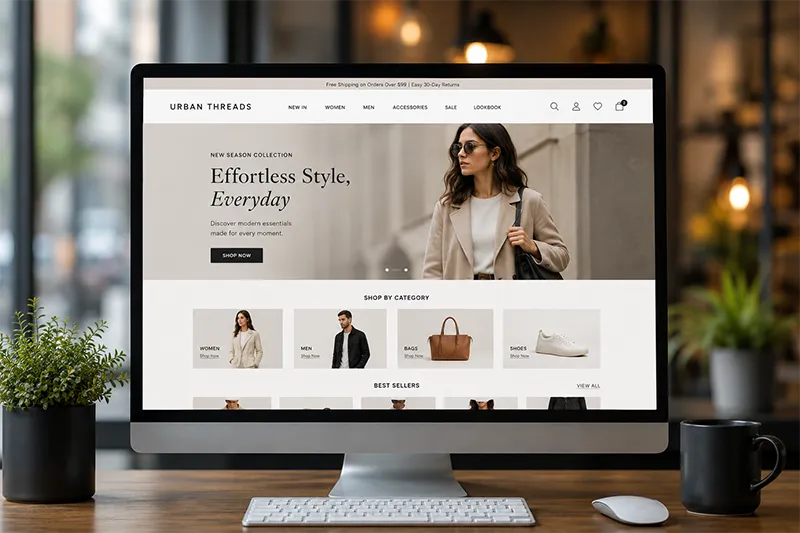
Looking at ecommerce website examples can help businesses understand how different design approaches work in practice. Instead of copying another store, study how successful websites organise their navigation, display products, use imagery, present pricing, structure product pages, and guide customers towards checkout.
Pay attention to the complete shopping journey rather than focusing only on the homepage. Look at how quickly you can find a product, whether filters are useful, how product information is presented, and how easy it is to add an item to the cart.
You can also compare different industries. A fashion store may prioritise product photography and size selection, while an electronics store may need detailed specifications and comparison tools. The best approach depends on the products and the expectations of your target customers.